Installing the Floodlight for B2B Mautic plugin
Prequel: What Floodlight is good for
"A Website's Blind Spot": Anonymous Visitors
Mautic already allows you to interact with leads that have identified themselves to you, for example by filling out a form or signing up to your newsletter. But, until know, it has had a big blind spot: Visitors are anonymous by nature, unless they fill out a form.
Now would not be nice to know at least the company of an anonymous visitor? Imagine these cases:
- A purchasing rep of a company matching your ideal customer profile looked at multiple pages on your website, and spends several minutes on one your product pages. Based on their size, you choose the best sales strategy, from direct contact to retargeting, to acquire them as a customer.
- You have wanted to win a certain company as a client for a long time. Now, finally, one of their employees visits your website and looks at products, prizes and your certifications. You can pass that information to your sales department who can finally close the opportunity.
- On of your existing clients spent a long time on your support page and cancellation terms. You immediately enact measures to try and prevent the churn.
So again, you would need to know which company these visitors work for. Luckily, there is a solution for just that: Floodlight for B2B.
“Let there be light”: What Floodlight does
When an anonymous contact visits your website, Floodlight tries to determine which company this contact belongs to, e.g. if their IP address comes from a company network. When Floodlight has identified the company, it is automatically created in Mautic, and the anonymous contact is assigned as its member.
But that’s only the beginning: Floodlight also adds useful data to the company, like its size, industry and location. This allows you (or rather Mautic) to qualify and segment those companies - using the Account Based Marketing (ABM) plugin for Mautic - and act on the relevant ones.
Setup
1. Install the Plugin
There are 3 ways to install the Floodlight plugin: You can either install it directly in Mautic via the marketplace, you can install it manually after downloading it from our GitHub, or you can install it via Composer by requiring leuchtfeuer/mautic-floodlight-b2b-bundle. For more details on the exact steps, please take a look at our README.
2. Add your API Credentials
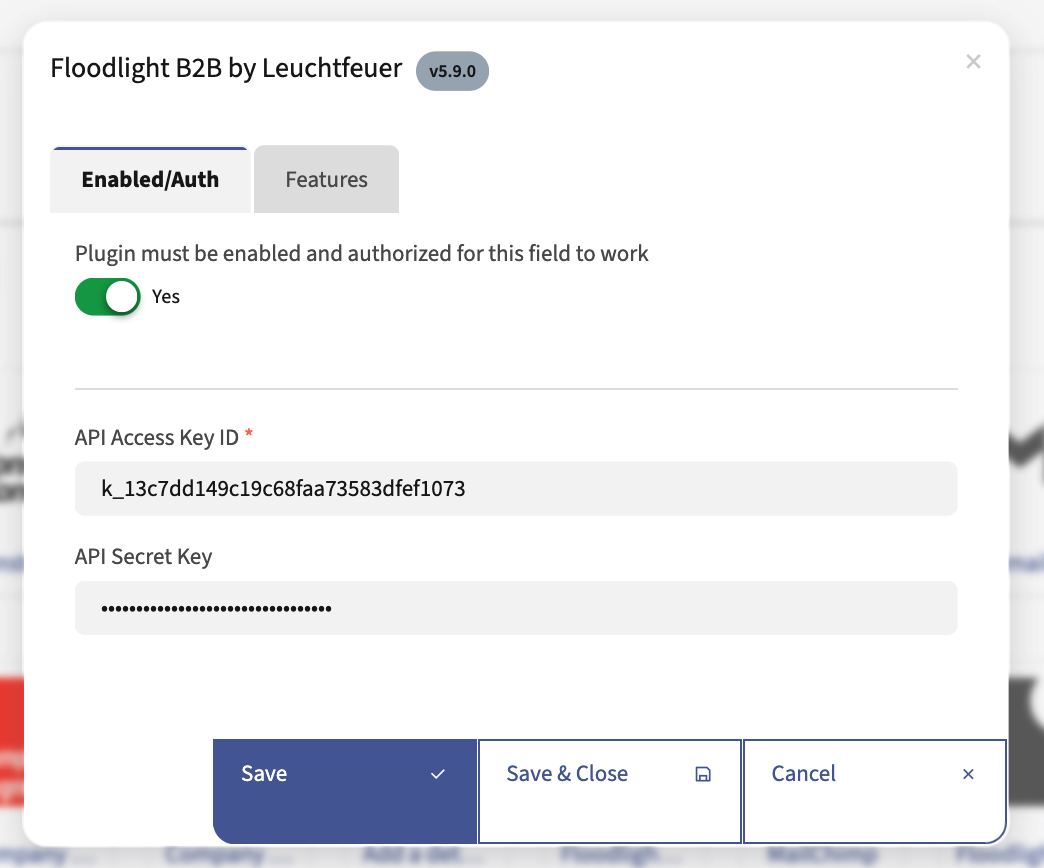
After the plugin is installed, it’s time to add the API credentials you have received via email (Don't have them yet? Sign up to Floodlight for B2B for free, then subscribe to a free or paid plan.) These are the steps: As Mautic admin, go to your Mautic’s plugin overview, click on “Floodlight B2B”, and copy/paste your API key and secret into the text fields. Also, turn on the switch at the top to activate the plugin, and don’t forget to save your changes.
3. Configure the plugin
The “Features” tab in the plugin configuration contains 2 useful settings:
- “Ignore Single-Click Visits” only searches for a contact’s company if they have visited at least 2 pages on your website. This reduces the noise created by people who have visited and then immediately left your website, indicating that they probably weren’t useful leads to begin with.
- “Ignore Telcos” skips the company lookup for people visiting via telco, i.e. a regular internet provider. After all, lots of visits by their customers in no way indicates interest of the company itself.
4. Control center: The Mautic Dashboard widget
The Floodlight plugin works completely autonomously, so you don’t need to do anything else: It automatically detects leads and creates the corresponding companies in the background.
In the meantime, you can track your current API credit usage in the dashboard widget. The widget is automatically added when you install the plugin.
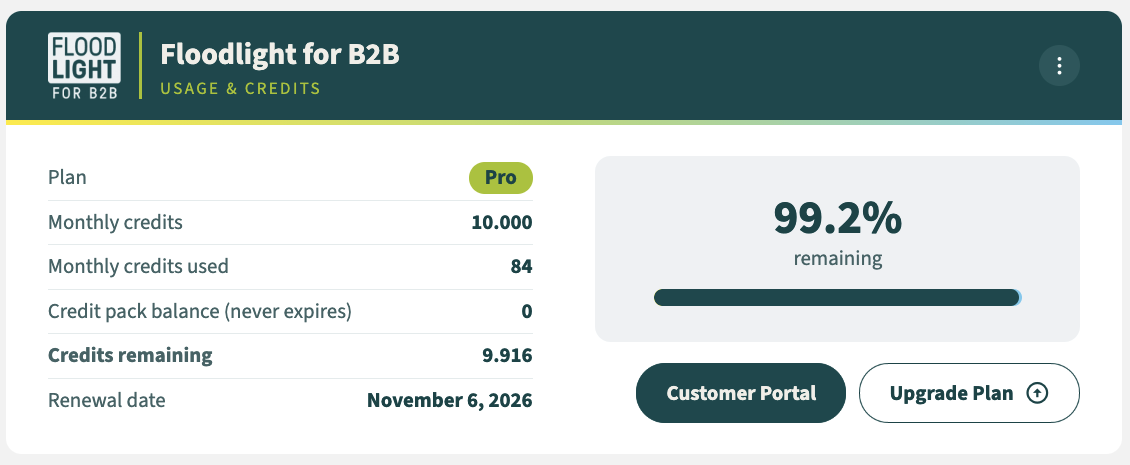
Here you can see your total amount of credits, how many you have used or remaining, and when your limit will be reset.
Working with the detected companies
With Floodlight working in the background, and the information it provides you directly in Mautic, you can now jump into action: Target companies that show interest in your products, keep an eye on potential clients, and take measures to secure your existing clients.
Of course, that is only the beginning. Since Floodlight automatically creates new companies, it is helpful to extend Mautic’s capabilities for handling companies. The Account Based Marketing Bundle adds Company Segments, which can be used just like regular segments to categories, and many more functionalities around companies (scoring, reporting, dashboard widget, timeline, …)
For successful real-life tactics on Company-Based Inbound Marketing and how to implement them in Mautic, see our tutorial on Best practices for using Account Based Marketing (ABM) in Mautic with Floodlight for B2B.